Tampilkan postingan dengan label tips and tricks. Tampilkan semua postingan

Senin, 16 April 2012

Trick to convert Videos using VLC Media Player

Hii Friends....I hope you all are fine!! As most of us know VLC Player is an awesome media player that supports almost all Video Codecs. But most of the people are unaware about it's amazing feature that this amazing utility can also convert videos. So, it is a multi-purpose media player. This will convert videos easily in your desired format. If you do not have this amazing utility, Download it from here.


Read More....


Steps to Convert Videos using VLC Media Player:


Open VLC Media Player.
Now select Media Option.
Select Convert/Save option from the drop down menu.


Now a new pop-up window will occur. Click on Add button located under the files to select the that you want to convert.
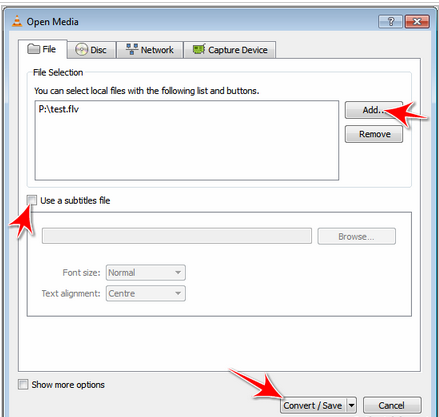


You can also add subtitles which will be hardcoded to the converted file.To add subtitles check the Use a subtitle option.(Optional)
Now Click on Convert/Save button. You will see another window.
Select the Destination File and Profile( Conversion Format ).
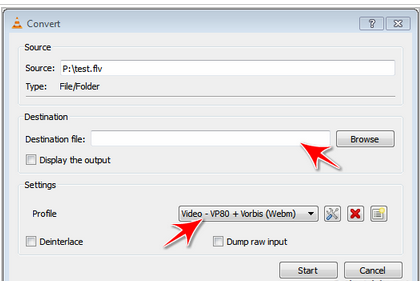


Click on start button to begin conversion.
And now the video Conversion will start and you will see something like streaming!!

Now you have learnt to Convert videos using VLC Media Player!!

Rabu, 28 Maret 2012

How to view all regional language in opera mini(tamil,telugu,malayalam,etc

Unlike Our Phone's Default Web Browser,Opera Mini has an Unique Ability to Display Many Regional Fonts of Different Languages and Characters.This is the Trick to Enable Viewing allKinds of Fonts:-1. Go to Address Bar of Opera Mini.2. There, Type this:about:config orconfig:3. Now, A Page will Appear.4. In the 'Enable Bitmap Fonts' column,Change the condition to 'Yes'5. Then, Click 'SAVE' which'll be found at the last of the Page.That's It.!With these 5 Simple Steps,You'll be able to Read all Kinds of Fonts.if you have any problem comment here..