Tampilkan postingan dengan label Google chrome. Tampilkan semua postingan

Selasa, 17 April 2012

Google Chrome: Reopen Closed Tabs


We have all accidentally closed a tab in Google’s Chrome browser. This can be a very frustrating situation. Chrome is quite forgiving and allows you to easily reopen the closed tab, even if you have closed other tabs after it. These instructions for windows and mac computers will show you the different ways for restoring or undoing an accidentally closed tab. Updated with new methods and to point out the different methods used on Windows and OS X systems.


As Google has improved Chrome through out the various versions, this has become easier and easier.


Keyboard Shortcuts

Using the keyboard shortcut Ctrl+Shift+T, Chrome will open the last tab that was closed on a Windows system. Likewise, command+Shift+T reopens to last tab on a Mac system.

If you use the keyboard shortcut again, and it will open the tab that was closed before that. This can be repeated to restore up to the last 10 tabs that have been closed during your browsing session.
New Tab Page

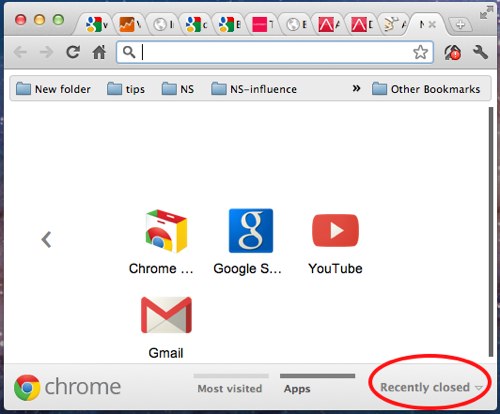
Open up a new tab. Go to Recently closed section located in the lower-right of the page. You will find the last 3 tabs that have recently been closed during your browser session. This works on all versions of Chrome.

Windows Right-Click

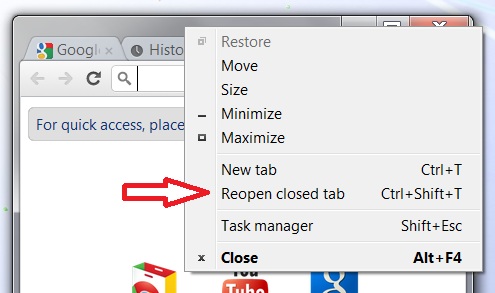
In Chrome running on Windows, you can also right-click on the window frame above the toolbar. The context menu that appears will have Reopen closed tab as an option.

OS X Menu Selection

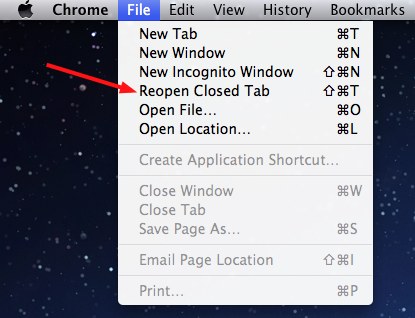
Since the Chrome browser on mac systems continues to have a menu, you can reopen tabs using this method as well. Go to the Chrome menu, select File, and then click Reopen Closed Tab.
Senin, 16 April 2012

Google chrome multitask mode


Chrome Multitask Mode lets your browse the web with multiple cursors at the same time, so you can get done faster then before, because some user have to work with many work in one single day of work. Chrome have developed something that allow user to multitask when doing their work, checking their email and many more.


The principle for this multitask mode is simple, user have use two mice on only one computer and they can share one computer with another person beside him or her. So that means more mice for one web, so little time needed. Multitask Mode allows you to browse the web with more than one mouse, so you can see more, do more, and wait less. Unleash your bilateral potential.


Multitask Mode lets you use as many mice as you can plug into your computer, so you and your friends can navigate dozens of sites, at the same time, on the same device. All hands on deck. That mean a lot of saving. And you can play a game while you design a presentation. Purchase land while you meet the love of your life. There's not enough time to only use half your hands, so just plug and play and work.


To see it more please watch this video 


To try it out ! just click below link
                                                       

Rabu, 11 April 2012

DOWNLOAD GOOGLE CHROME OFFLINE INSTALLER


Google chrome,from Google Inc. is the second most used browser after the Mozilla Firefox.But if you try to download Google chrome from Google’s official site ,it will give you only a online installer executable file.That is you cant carry that one to another system for installing it with out internet connection.So whenever you want to installGoogle chrome in your system you have to connect your system to internet and have to install.

But the Google chrome offline installer will allow you to copy the setup file from one system to another and can install it with out the internet connection.

Google itself providing a copy of offline installer to download from their official site and most of the users are not known about this facility.

You can download Google chrome offline installer for Windows,Linux and Mac operating system from the following link


.Download Google chrome offline Installer