If someone talks about the email service you are using your answer would be GMail, Yahoo or Hotmail and obviously you would be having some boring email address likeyourname.yourbirthyear@gmail.com or yourname.yourphonenumber@yahoo.combut what if you wanted to create some unique name based on your profession likeyourname@teacher.com or yourname@doctor.com or you can also choose from any other niche you would like.
 Well Mail.com brings you all these possibilities for free, with Mail.com you can create your personalized email under any niche you would like you can choose from the regular professional ones, or choose any domain from your hobbies category or give it some techy taste like yourname@techie.com whooh that looks quit hot for a blogger like me. You can check out all domain names here.
Register Email Address with Mail.com :
So now you can register your own professional, unique email address using mail.comregistration page, just add all the basic information choose which domain you want to go with and register your own personalized email address.
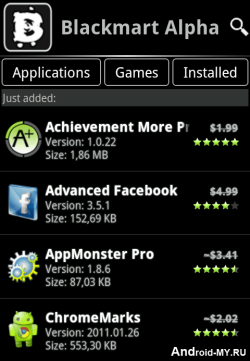
Black Market is another similar application to Applanetwhich we posted earlier and allow you to download thousands of Android Applications and Games right to your device that too for free. It’s a simple .apk app which you can transfer to your device and than install it in a normal way.
Its officially not known as Black Market but its called BlackMart Alpha, it’s a new version which is the improved one and brings many bug fixes. You canDownload BlackMart Alpha Android app and than transfer that file to your android device.
After installation Fire-Up the app and your will interface like on the right hand side image, juts browse entire collection of wonderful apps and games which can be downloaded easily.
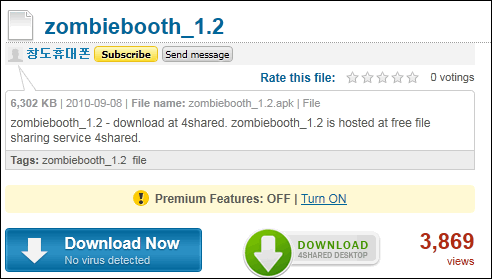
Well the another way of downloading Android Apps for free is using 4Shared which you can also check out. Well hope that you like this applications and would love to download many many apps. If you find this post useful than make sure to share it with all your friends.
Update : Many people commented that they see blank screen while using Applanet app, well I think so that will be fixed soon or else you can use BlackMart Alpha app for Android device which is similar to the Applanet app but works somewhat fine.
 Android is one of the best OS available right now as its is owned and developed by Google. Now all the latest phones comes with this new OS preinstalled in them and its really awesome. You have many apps and games which you can play on your smart phone but the thing is that many good ones are paid, so to get those paid ones you have to link your debit card than pay them and than you can enjoy those games or you can simply install a simple app with which you can download those apps for free of cost.
Applanet is that small awesome application for Android devices with which you can download any apps or games those are paid for free. It is somewhat same like Installous app we have for iPhone which we install using Cydia.
How Applanet Works :
Applanet is a simple app for Android which simply provides with the paid apps and games for free which you can download right on phone. You simply download and install this app and than search - download - install any application from it for free. Its totally free of charge and simply takes few minutes to install.
How to Download & Use Applanet :
Now if you also want to install paid apps and games for free on your android device than simply Download Applanet App for your android phone and than copy it to your phone, now navigate to it through file manager or anything and click on it to install it.
Now simply navigate to this app from your application menu and fire it up, enjoy searching and downloading apps on the go. If you find this difficult and cannot make it up with it than comment below with your problem and hopefully I will solve it for you.
Right Click Tweaker for windows can be used to add some more options to increase your overall work output, you can add some essential daily used shortcuts so that whenever you are doing your work and you need that specific options than you can use it easily.
Applying tweaks is really easy with right click tweaker tool, you just select the options you wanna add in your right click and click on Apply Tweaks and those options will be added automatically.

Features of Right Click Tweaker :
1. Copy To Folder & Move To Folder :- When you choose one of the options from the menu, you browse to any place on your hard disk to copy or move the file to that folder. You don't have to navigate to the place where you want to paste your file.
2. Create or Print File List :- Allows you to print or create file list of a folder by right clicking on folder and selecting one of the option.
3. Encrypt & Decrypt :- Allows you to encrypt and decrypt your files and folders. Files encrypted can´t be operable by another user on the PC.
4. Open In Notepad :- Allows user to open any file in notepad by just right clicking it.
5. Open file location :- Allows user to open the file location by right clicking its shortcut.
6. Administrator Command Prompt :- Allows user to open an elevated command prompt with highest privileges from any folder by right clicking it.
7. God Mode & System Configuration Utility (Vista or 7) :- Add the options to open System Configuration Utility(msconfig) and famous god mod from user´s right click menu.
8. Problem Step Recorder (Windows 7) :- Problem Step Recorder is a hidden feature of the Windows 7. This tool bring this to your right click menu.
9. Take Ownership (Windows 7 or Vista) :- Allows user to take ownership of files and folders owned by other users on computer.
10. Copy Content To Clipboard :- Allows user to copy content of text files just by right clicking it.
11. Search and Replace :- Allows user rename multiple files in a folder at once.
Download Right Click Tweaker for Windows :
If you like all the features of this little utility than you can download it form RBSoft official weebly website using this download page link, hope you like this tool if you find any problem do comment.
PC Suites is named suite as it comes bundled with many features you can crawl right from your PC for your smartphone, the one an the most preferred is connecting and using your mobile internet connection on your PC. Well it can also be used to transfer contacts, read or compose SMS and do pretty more stuff. So now if you own a Micromax mobile and you wanna download its PC suite well obviously you will get a CD with you phone but in any case you just lost it than you can download it using their official website.
Well you can download PC suites for any phone model for Micromax Mobiles from their official website, well I just saw a problem on their website that few images are not loading maybe there is a problem from backhand so just select your phone model from above and than hover on the unloaded images to see the popup than just click on the download PC suites options and you can get your PC Suite downloaded to your PC.
Now just enjoy using your Internet Connection, transferring contacts or doing anything with Micromax PC Suites.

Many users of Facebook have more than one profile, one for their own professional image, one for games and applications and some just for family and friends. Having to manage multiple profiles can get annoying, as it should be carried out continuously or logout and login you must use multiple browsers to perform an automatic logon.
But all this now becomes a breeze with the extension Google Chrome Quick Login Accounts for Facebook.This google chrome extension allows you to manage up to 5 Facebook account at the same time. It can enter the data access and change our profile for each account with a click from the Facebook login screen. The extension is also safe, passwords are encrypted and stored only on your computer.
Here’s a quick video demonstration:
Here is the link: Quick Login for Facebook Accounts
 Well Mail.com brings you all these possibilities for free, with Mail.com you can create your personalized email under any niche you would like you can choose from the regular professional ones, or choose any domain from your hobbies category or give it some techy taste like yourname@techie.com whooh that looks quit hot for a blogger like me. You can check out all domain names here.
 Android is one of the best OS available right now as its is owned and developed by Google. Now all the latest phones comes with this new OS preinstalled in them and its really awesome. You have many apps and games which you can play on your smart phone but the thing is that many good ones are paid, so to get those paid ones you have to link your debit card than pay them and than you can enjoy those games or you can simply install a simple app with which you can download those apps for free of cost.